
When it comes to search query data, Google has always been a little protective. But in fall 2011, around the time when Google shocked search marketers around the world with their switch to SSL, I discovered something new on the AdWords interface:
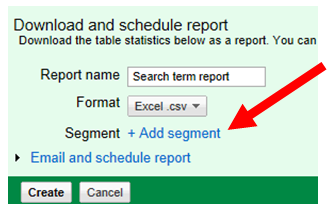
Now I don’t know how long this little button has been sitting there. No one seems to have noticed, at least I couldn’t find any articles or conversations about this. Or maybe I’m just the only one who cares…
Okay, you can add segments to your search query reports now. You can’t display any segments in the interface directly, but you can add segments when you download a report:
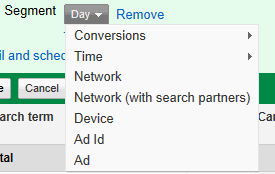
So we have conversions (both name and tracking purpose), time (everything but hour of the day – too bad), networks, devices, the ad id and the (whole) ad. The data isn’t completely new: It has been available through the AdWords API for some time. Only now it’s available for ad hoc reports that everyone can download. (The API still has the advantage that you can include keywords in search query reports.)
Analyzing Devices
Segmentation by device allows you to evaluate how people have searched for your keywords from different devices. In case you haven’t bothered splitting up a campaigns yet, this might be interesting. And even if you have, you can also take a look at your old data from when campaigns weren’t split up yet. That might be interesting.
Analyzing Search Partners
What I’m really excited about is taking a look at search partner queries. This affects the daily work of a PPC manager and opens up some advanced opportunities. For now, let’s look at the daily practice.
In your day to day work, looking separately at search partner queries and Google queries gives you a chance to better understand your traffic and your numbers. To illustrate this point, I have pulled some numbers from a search query report. Look at these queries:
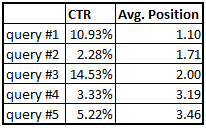
All of those queries were relevant, had high impression counts, and came with matching ads. But there seems to be something very wrong with the second query – just 2.28% on an average position of 1.71? Is the ad for this query really so bad for that query? This would suggest that something needs to be done.
However, separated by network these numbers look a little different:
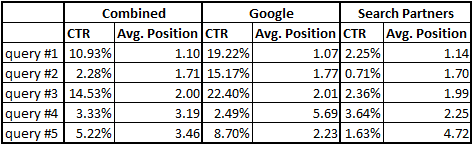
It becomes clear that the first three queries all have great click-through rates on Google, but low CTR’s on search partner sites – even though the average positions are virtually the same. In case of query #1 the impression counts for Google and search partners were similar, resulting in the average CTR somewhere in the middle.
Query #2 had much more search partner impressions, resulting in an average CTR much closer to the search partner CTR. Even though the query did great on Google, it’s average CTR indicated otherwise.
Query #3 had more impressions on Google, therefore the average is closer to the Google CTR.
In case of queries #4 and #5 the differences are moderate. I’ve included those to illustrate that there is no general pattern here: search partners don’t always come with lower CTR’s. They are lower on average, but not in each individual case.
Google CTR vs. Search Partners CTR
Comparing CTR’s for individual queries I found that on Google a double-digit CTR occurs significantly more often. On search partner sites CTR’s are rarely that high, but very low CTR’s aren’t uncommon. One reason for this is that ads on search partner sites usually aren’t as prominently displayed as the top ads on Google. This means that even a great ad often can’t get a high CTR. On some sites 2% might be as good as 20% on Google.
Many of us have a vague feeling of what CTR’s should be on Google. But when it comes to search partners, our intuition is useless. There are just too many different sites and you normally have no idea on which subset of those sites your query appeared. This makes the combined performance of search partner sites unpredictable.
The bottom line for your day to day optimization is to focus on the numbers from Google and base your decisions on them. I don’t say that you should always download a segmented report. But when in doubt, you should have this in your toolbox.

Martin Roettgerding is the head of SEM at SEO/SEM agency Bloofusion Germany. You can find him on LinkedIn.
Hey Martin,
Segments have been around for adwords reports since mid 2010: http://adwords.blogspot.com/2010/06/sharing-is-caring-new-ways-to-segment.html and you can add/view several segments in the AdWords UI at least since mid 2011 as far as I could find solid evidence of from AdWords but I believe it’s been around since 2010 too: http://adwords.blogspot.com/2011/07/top-vs-side-ad-performance-segmentation.html
Search partner data has been separate from Search since 2008: http://adwords.blogspot.com/2008/10/separate-metrics-for-google-and-search.html
No need to publish this comment – this was just a friendly fyi. 😉
To your continued success,
James
Hey James,
Thanks for the friendly fyi and the offer to not to publish it 😉 But I think there’s a misunderstanding.
Of course I know that segmentation has been around for a while and that search partner performance can be viewed on the networks tab, as well as in many other segmentations. But the for search query data this segmentation wasn’t previously available (in the UI).
Until recently you could see segments for keywords, campaigns and a lot of other things, but not for search queries. I guess not many people have missed this in the past, but I think it’s an important feature – especially since it affects a basic PPC task (analyzing queries and deciding where new ads are needed).
Martin
Hi Martin,
I should have clarified in my comment.
You said this: “Now I don’t know how long this little button has been sitting there. No one seems to have noticed, at least I couldn’t find any articles or conversations about this. Or maybe I’m just the only one who cares…”
I meant to say “On the contrary, this little fancy button has been sitting there for nearly 1.5 years…” see http://adwords.blogspot.com/2010/06/sharing-is-caring-new-ways-to-segment.html
You said this: “You can’t display any segments in the interface directly, but you can add segments when you download a report”
I meant to say “Actually, there are quite a few ways to visualize/report segments in the AdWords UI since at least mid 2011 although I do believe it has been around since 2010.” see http://adwords.blogspot.com/2011/07/top-vs-side-ad-performance-segmentation.html
You summarize your post nicely in your comment with: “Until recently you could see segments for keywords, campaigns and a lot of other things, but not for search queries.”
I was wrong here but I meant to say: “You could see this data in 2008.” see http://adwords.blogspot.com/2008/10/separate-metrics-for-google-and-search.html
In 2007, AdWords added Search Query Performance reports that only included search networks: http://adwords.blogspot.com/2007/07/how-to-use-new-search-query-performance.html
In 2008, you could separate the metrics at the ad group and campaign levels. see http://adwords.blogspot.com/2008/10/separate-metrics-for-google-and-search.html
Turns out you could see that data in mid 2009 Search Query reports…but first in Keyword reports at the beginning of 2009. see http://www.ppchero.com/want-better-reporting-for-the-google-adwords-search-partner-network-you-got-it/
I agree that this is a VERY important, underutilized report for marketers to use and I’m glad you wrote about it. 🙂
Best,
James
James,
Are we talking about the same thing? I am only talking about segments for search query reports.
http://adwords.blogspot.com/2010/06/sharing-is-caring-new-ways-to-segment.html shows that it has been there for campaign reports, but says nothing about search queries. And that’s my point: You can view and segment a lot of data, but for search queries this is new.
When I said “You can’t display any segments in the interface directly, but you can add segments when you download a report” that was just about the search query report (as indicated in the sentence before). You can try it out: Look at search queries without downloading them. There is no button for segmentation in the UI. Only by downloading you get to see these segments.
You wrote “Turns out you could see that data in mid 2009 Search Query reports” – I am very sure that there was no way to separate numbers from Google and search partners on a query level in 2009. I remember a great presentation about identifying queries from search partners from SMX Advanced Seattle in 2010. There was no easy way to do this back then… I tried 😉
Best
Martin
Maybe this helps: Martin, I think, you are looking this up in the tab “Dimensions”. You set the “View” to “Search Terms” and when you download a reporting then, you are able to add the segment “Network (with search partners)”.
You can’t do that segmentation in the “normal” keyword-tab.
Hey Thomas,
Whether you go through Keywords and “See search terms” or use the dimensions tab, it’s the same. In both cases you can’t display any segments for search terms in the UI and in both cases you can add segments to downloaded reports.
Maybe a picture is better. This is what I mean: /wp-content/uploads/2012/01/ui-segmenting-search-terms.png
Yes, the picture is better than 1.000 words. 🙂
But when folding out the “segments” on keyword-tab, you don’t get the option “network (with search partners)”. they are different from the one in the dimension-tab (viewing “search terms”). Maybe this led to cunfusion.
Sorry, now I was confused – same for reportings.
When using the reportings, I can only add the segment “network (with search partners)”, when I’m on the dimension-tab. On the keyword-tab, I have other segments in the reporting-options.
Yes, but this is about search terms, not keywords 😉 Although it’s strange that you can’t segment keywords by network… I mean you can get the same data by using the segment “Top vs. Other” so why not make it available directly? But I guess that’s another issue…
More interesting would be a list of search-partners and the option to set some of them to negative. But this is also another issue to be solved by big G. 🙂
Hi Martin,
Thanks for the SMX shoutout from 2010! Glad to see someone was paying attention. 😉 Anyways, I think segmenting search queries by search partners is important because you can clearly see the breakdown of your ad impressions at the query level across each network. That data comes in handy, for instance, when trying to determine whether to break out new ad groups based on query performance. Transparency is key and I think Google is heading in the right direction by adding these filters. Oh, and the picture certainly helped clarify your point.